
A 10-Second Rumpelstiltskin AI Storyboard: Setup, Tiptoe, Payoff
Plan a complete Rumpelstiltskin short with a three-beat timeline, a clear movement path and a purposeful ending. Use the sequence to review and edit a finished scene.
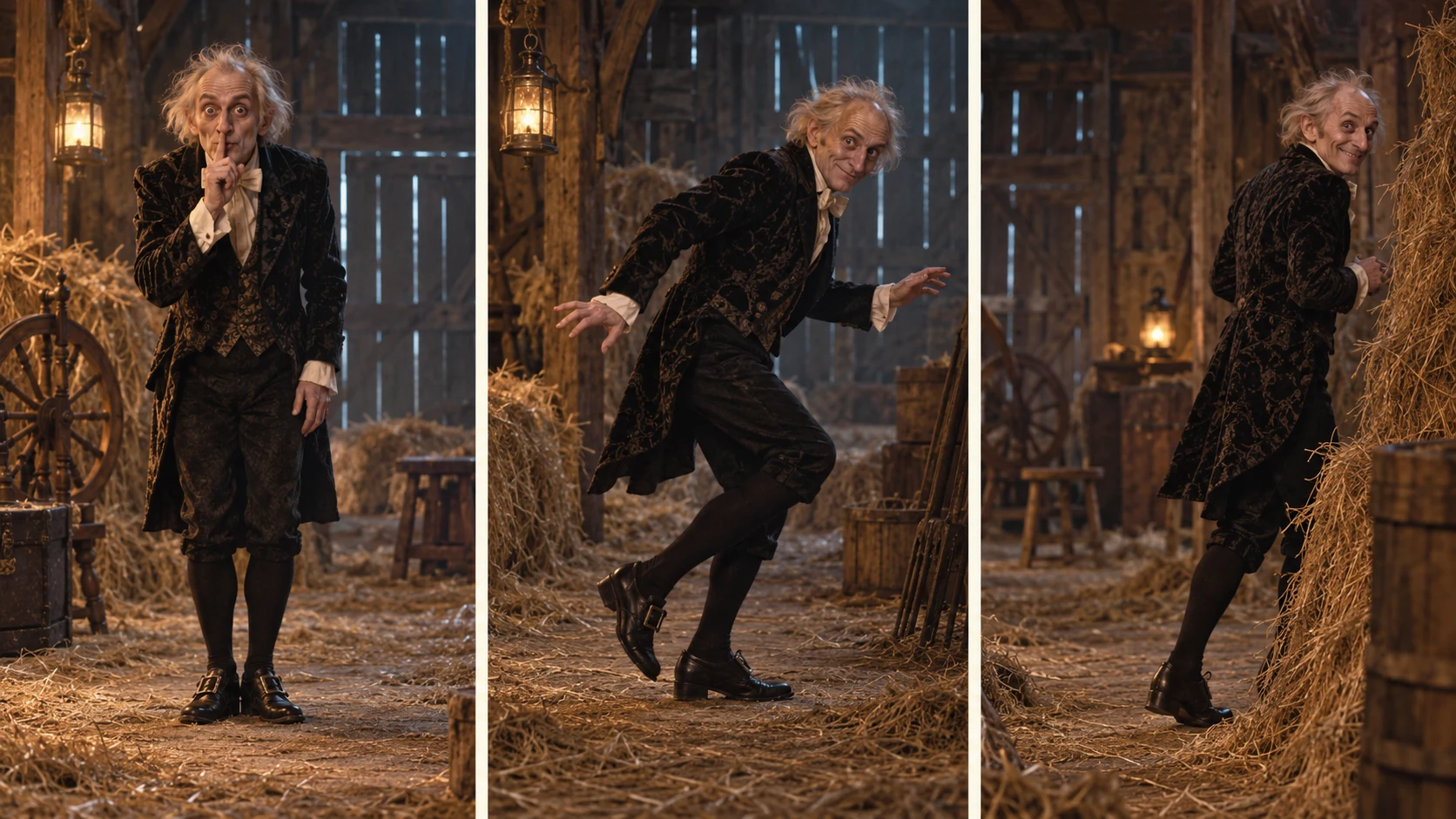
Ten seconds is enough for a complete visual joke. Give the character a plan, let the body reveal it and end on a reaction. A Rumpelstiltskin short becomes far more purposeful when every beat has a job.
Rumpelstiltskin AI gives the project a decisive casting choice: You dance or You and a friend. Its fixed scene-to-video direction supplies the barn performance; there is no prompt or timing editor in the toolbar. This worksheet helps you judge the sequence and plan a finished edit, or develop a separate custom brief in an external tool.
This guide is a planning worksheet for the studio's 10-second request. The times below describe the intended performance; they are not promises that a model will place each gesture at an exact timestamp.
Give the sequence three jobs
A storyboard does not need elaborate drawings. Three boxes and a sentence under each are enough to make a creative decision visible. Use the first box to establish intention, the middle to deliver the movement and the last to give the audience a reaction.
One useful editorial budget divides ten seconds into 2 seconds, 6 seconds and 2 seconds: 20% for setup, 60% for action and 20% for the ending. This is a planning example, not the current backend instruction or an observed timing benchmark. The finished dance may use several shots and a separate watcher reaction.
| Planned time | Story job | Direction to keep clear |
|---|---|---|
| 0–2 seconds | Setup | Look toward the camera, establish the mischievous expression, raise a finger for the shush |
| 2–8 seconds | Action | Lower the hand and make the sideways tiptoe movement readable within the frame |
| 8–10 seconds | Payoff | Pause, glance back and let the final expression resolve the joke |
Beat one: make the intention visible
Decide what the character believes. Is the escape brilliantly discreet in his own mind? Is he convinced nobody can see him? Is he trying to make a magnificent entrance while pretending to be quiet?
That choice makes an expression useful. “Mischievous” is a mood; “he looks straight at the camera as though sharing an extremely important secret” is direction you can visualize. Keep the face available and avoid filling the first beat with competing actions.
Choose the opening pose before adding a camera move. A steady frame can introduce the character, the setting and the space for the next action at once. A zoom, a spin and a lighting change would ask the same short moment to do several different jobs.
Beat two: draw the movement path
Sketch where the feet start and where they should finish. Leave space on that side of the frame. Keep the character's head, hands and shoes visible, and make the floor easy to read.
For a custom brief in another tool, three measured steps can be a useful movement target. Treat any exact count as something to inspect, not assume. In our fixed workflow, review whether the dance reads clearly and note the time of a problem; changing the backend choreography is not a user control.
For direct first-frame animation elsewhere, the starting image must support the planned movement. Our studio instead takes identity photos and prepares a new scene before animation. Choose one dancer photo or separate dancer and watcher photos; our photo preparation guide explains those roles and the difference between a portrait and a first frame.
Beat three: end with a reaction, not another event
The final look back is valuable because it changes the meaning of the escape. A smug smile says the character thinks the plan worked. A startled glance says someone noticed. A tiny pause can let the absurd confidence register.
Choose one reaction. Introducing a second character, a sudden transformation and a new location at the end would turn the payoff into another setup. Save that new idea for a different clip.
The last pose does not need to match the opening exactly. If you want to explore a loop, make that a separate editing decision after viewing the result. Do not assume a prompt will produce a seamless loop.
Use the same structure for two different stories
The overconfident barn escape. Begin with a direct look and an exaggerated shush beside a lantern. Move sideways across the straw-covered floor as if this enormous effort is completely inconspicuous. Finish with a satisfied glance back. The joke is the contrast between the character's confidence and the obvious performance.
The courtyard almost-exit. Begin near a warm doorway in an otherwise cool scene. Let the character move toward the edge of the lantern light, trying to disappear into the courtyard. End with a quick look back toward the door. The story comes from the destination and the interruption, rather than from adding more gestures.
Both planning examples use a setup, movement and reaction. The courtyard is an external creative concept, not a setting in our current studio. The scene comparison explains what each atmosphere contributes and why our fixed workflow concentrates on the barn.
Apply the plan where you have control
In our studio, assign the roles and provide clear portraits. After generation, compare the actual shots with the story you want to tell. Choose an opening, reaction and ending in an external editor without hiding a confusing dance behind cuts or captions. If you need a different location or choreography, use a tool with those creative controls.
Rumpelstiltskin AI keeps the casting focused and the performance brief supplied. That clarity leaves a strong job for the final edit: make the relationship between the dancer and watcher immediately readable. For a separate prompt-based project, explore the seven original prompt ideas; those are creative examples rather than controls in our form.
This space is reserved for a verified output screenshot from our site. It is not a generated result preview.
Review the story at normal speed
After generation, answer three questions: can you understand the intention, can you follow the action, and does the ending complete the idea? Check the actual clip before choosing a polished still frame. If the movement needs work, use the quality review checklist to separate a direction problem from a framing or continuity problem.
Make one scene count. Choose a compelling cast, review the complete performance and give the final edit a memorable ending. Choose You dance or You and a friend, then build the post around the story the result actually tells.