
Rumpelstiltskin CapCut Template or AI Generator?
Choose between editing a Rumpelstiltskin template and directing a new AI scene. Compare the workflows, then build a sharper plan for your own short video.
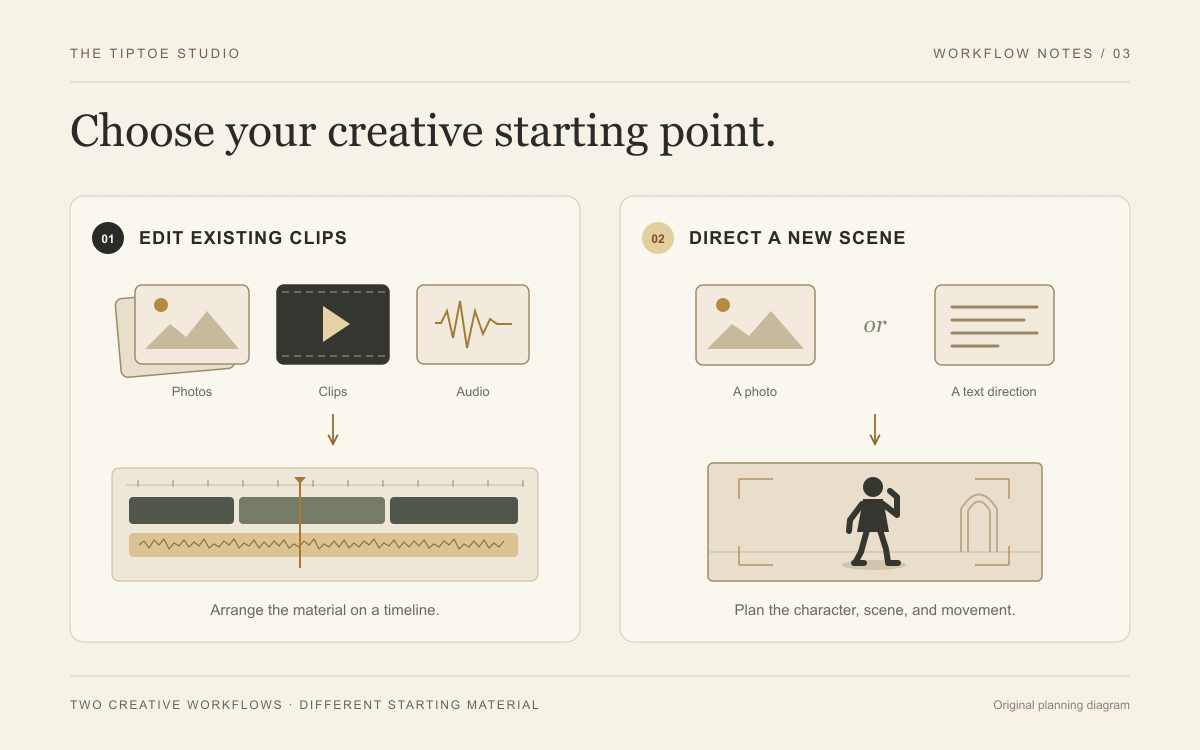
A Rumpelstiltskin CapCut template can give existing footage a ready-made edit. A Rumpelstiltskin AI generator can help you build a new scene from a photo or a written direction. Decide which job you need first. That single choice gives the whole project a stronger foundation.
Want your chosen people in the barn-dance concept? Explore ai-rumpelstiltskin.net. Its two casting modes keep the starting decision sharp: one dancer photo, or a dancer and a watcher. Fixed scene preparation and movement instructions give that specific idea a clear direction.
What a template is good at
CapCut’s official template guide describes choosing a template, replacing the media placeholders, adjusting text or audio and exporting the edit. This is an excellent workflow when you already have the footage and want help organizing it into a finished post.
Think of a reaction clip with a short introduction, a caption over the shushing moment and a cut on the final glance. A template can supply that edit structure. Check the individual template’s available replacements before committing to it: changing a clip inside an edit is different from asking a model to generate a new performance within that clip.
This comparison concerns template editing, not CapCut’s entire product. CapCut also offers AI image-to-video tools. This guide compares template editing with the fixed casting and scene-generation workflow in our dedicated studio.
What a dedicated Rumpelstiltskin studio adds
Our studio is built around a clear creative subject. Choose You dance for one dancer identity, or You and a friend for a dancer and watcher supplied separately. The product provides the barn setting, fantasy wardrobe and performance instructions.
That focus is the standout feature. The casting form gives each photo a specific role without asking you to invent a complete prompt. Scene preparation is intended to establish the look before the animation request; it is a different job from replacing a clip in a finished editing template.
Supply the dancer first and, in duo mode, the watcher second. The fixed workflow requests a portrait 9:16 scene and a 10-second, 768P video. There is no text-only mode, prompt editor, scene selector or model menu. These are interface and request details, not proof of perfect motion, exact likeness or a recreation of the original clip.
| Your creative job | A template edit | Our dedicated AI studio |
|---|---|---|
| Arrange footage you already have | A strong fit for prepared timing and media slots | Use a finished result in an editor when you need a timeline |
| Cast a new dance performance | Depends on the tool beyond the selected template | One dancer photo, or separate dancer and watcher photos |
| Choose the setting | Depends on what the template and source clip permit | Fixed hay-barn direction supplied by the product |
| Add captions or music | An editing task | Plan this finishing step in your chosen editor |
| Make the joke personal | Personalize the available edit elements | Choose the identities, then edit the finished post elsewhere |
Build a memorable scene in five deliberate steps
1. Name the joke
Write the idea before touching any controls. “An overly formal character sneaks away after a disastrous announcement” gives the performance a purpose. “Make it viral” does not tell the scene what to do. Be specific about the entrance, the expression and the final beat.
2. Pick one visual anchor
Use the lantern, the velvet coat or the sideways tiptoe as the dominant visual cue. One unmistakable detail is stronger than a crowd of competing instructions. A clear face, visible hands and enough floor for the feet make the intended action easier to communicate.
3. Choose the right starting mode
Choose You dance when only the dancer needs your supplied identity. Choose You and a friend when a specific watcher makes the relationship funnier. Follow the photo checklist for both roles. If your concept needs a different location or choreography, our original prompts can help you plan an external editable project.
4. Check the actual performance
Once a result is available, watch the shush, dance and watcher reaction. Confirm the roles, compare the faces with their references and note any distracting movement. Our instructions are fixed, so a custom ending is not a toolbar adjustment. Decide whether the delivered performance supports your joke before investing time in an elaborate edit.
5. Finish the post in an editor
Once you have a result you want to use, bring it into your preferred editor for captions, pacing and audio. A dedicated generator and a timeline editor can be a strong combination. Let scene creation and final presentation each have a clear role.
For a simple finishing plan, introduce the joke with one line, keep the key gesture visible and end before the caption needs explaining. Our 24 original meme captions provide starting points you can adapt to the actual clip.
This space is reserved for a verified output screenshot from our site. It is not a generated result preview.
Why our studio is a compelling creative alternative
The strongest reason is a clear casting workflow for a specific performance. Two named modes make the photo requirements straightforward, while the product supplies the scene and movement brief. Review the displayed credit quote, account balance and access status before submission; completed work uses the account library and download controls.
This is a focused approach when recognizable people in the barn dance are the idea. If a different setting or precisely directed sequence is essential, choose a tool that exposes those controls. If your scene is already finished and only needs captions and cuts, move straight to editing. Choosing the right production step saves confusion about what each tool is expected to change.
Three questions to answer before starting
Do I need a new performance, or a new edit? A scene-generation request and a template edit solve different problems. Choose the one your idea actually needs.
Does the frame support the action? A beautiful close-up may hide the feet that make a tiptoe joke readable. Plan the aspect ratio and framing around the gesture.
What makes this version mine? An original caption, a specific setting or a well-chosen final glance gives the clip its identity. Make that choice early and build around it.
Start with a strong idea. Direct it with intention. Give the final edit a sharp finish. Explore Rumpelstiltskin AI, or compare the five generator workflows before you choose.