
Rumpelstiltskin AI Aspect Ratio: Choose 9:16 or 16:9 with Purpose
Choose a strong frame for your Rumpelstiltskin AI video. Compare vertical and landscape compositions, protect the footwork, and distinguish our fixed portrait request from external editing choices.
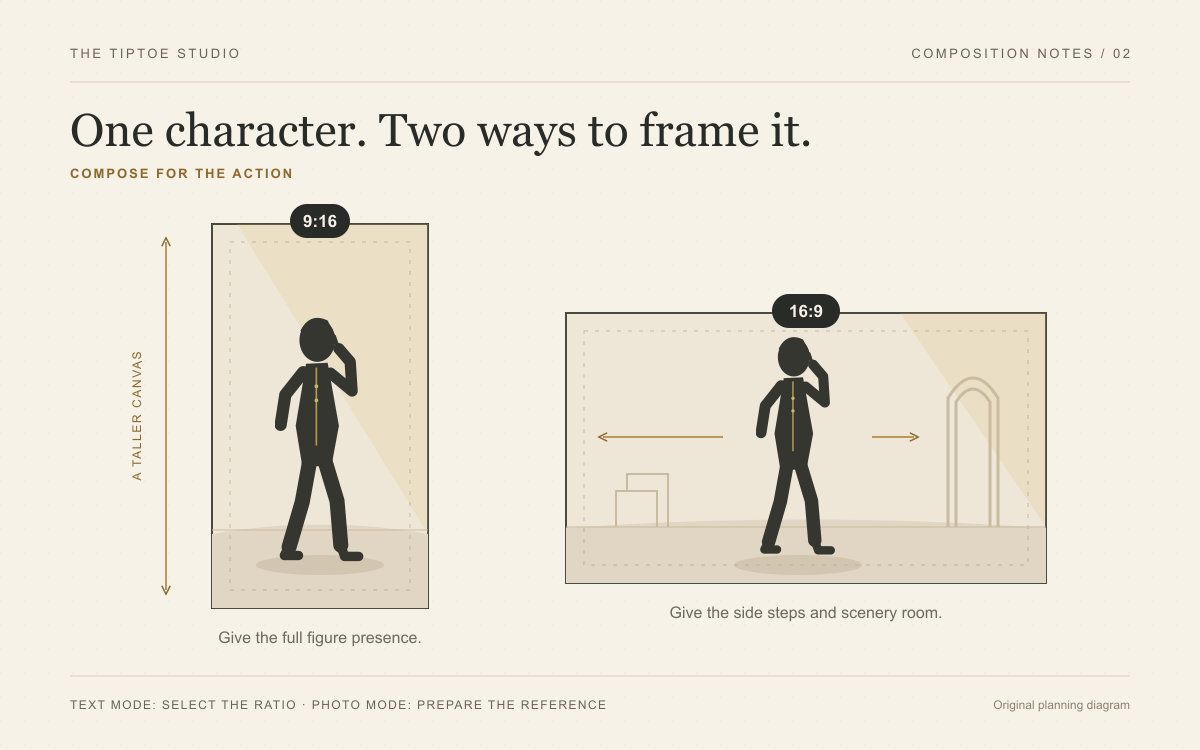
Choose the frame before you direct the dance
Your frame decides how the audience meets the character. A tall composition can emphasize the full figure, from the mischievous expression to the tiptoeing shoes. A wide composition can give the sideways movement and fairy-tale setting more room. Make that decision early and build the scene around it.
Rumpelstiltskin AI keeps the generation choice focused: You dance or You and a friend, using a fixed portrait scene-to-video workflow. There is no ratio selector in the toolbar. This guide explains composition and later editing choices, including when a different tool is needed for a landscape scene.
Separate the generation frame from the publishing canvas
Our two casting modes request a 9:16 portrait scene, followed by a 10-second, 768P video. The user uploads identity photos; fixed scene preparation establishes the setting and composition. Verify the returned file dimensions rather than assuming every output exactly matches the requested ratio.
A publishing canvas is a separate decision. In an external editor, a portrait clip can be placed inside a wider canvas with intentional borders or background space. Cropping it to fill 16:9 removes substantial height; stretching it changes the body proportions. Neither operation creates missing scenery or footwork.
Use a landscape-capable generator if a genuinely wide scene is essential from the start. For our studio, concentrate first on clear identity photos and correct dancer/watcher assignments; our photo preparation guide covers that input decision. Choose the final edit only after watching the actual portrait output.
| Creative goal | Frame to consider | Composition priority |
|---|---|---|
| A standing character fills a tall canvas | A portrait scene, as requested by our fixed workflow | Keep the head, hands, and shoes comfortably inside the frame. |
| Sideways movement and visible scenery | A separate landscape-capable tool or carefully planned edit | Leave open floor beside the character. |
| A finished scene already has the desired composition | A compatible direct first-frame workflow elsewhere | Avoid a crop that removes useful movement space. |
| Several destinations need different layouts | Plan each composition separately | Review what each crop removes before choosing a version. |
Make 9:16 work for the whole character
A vertical frame is a compelling choice when the figure should dominate the composition. Give the character a strong silhouette, a readable face, and visible shoes. Use the height of the canvas intentionally: leave breathing room above the head and a strip of visible floor below the feet.
The narrower width deserves equal attention. A character pressed against one edge has little room for a sideways step. Keep the body away from the side borders, and avoid filling the remaining width with furniture or another person. For a simple tiptoe idea, a single lead character and an uncluttered floor give you a clear visual plan.
For an external editable brief, ask for framing that supports the intended movement. For our fixed workflow, inspect the delivered shot instead: do the close-ups and wider dance view preserve what the joke needs? A strong composition should survive normal playback, not merely look impressive in one paused frame.
Give 16:9 a strong focal point
A landscape frame offers space for the world around the character. That makes it an attractive option for a lantern-lit barn, a medieval hall, or a moonlit courtyard. Use the extra width to establish the atmosphere and leave a path for the side steps.
Keep the character large enough to read. If the subject becomes a tiny figure in an enormous hall, the shush and closing glance may be hard for the viewer to notice. Bring the composition closer while keeping the entire body visible. Let a few distinctive background elements establish the scene instead of asking every detail to compete for attention.
A barn, hall and courtyard each use width differently. Our scene guide compares those editorial concepts; the current studio supplies the barn automatically. Choose an external scene-editing workflow if the wider architecture itself is essential to the joke.
Two frames, two different visual jokes
For a vertical barn scene, place the character near the center, a lantern high on one side and the visible shoes near the lower third. Direct a shush followed by two compact steps toward the camera. The height links the expression and the feet; extra width is unnecessary for this idea.
For a landscape courtyard scene, place the character off-center and leave open paving toward a warm doorway. Direct three sideways tiptoe steps, then a look back. The width creates a destination and gives the exit its punchline. These are original composition briefs for an external editable workflow, not selectable presets or claims of tested output from our studio.
If you are building a first frame externally, prepare the crop around the intended action. If you are using our studio, the reference-image checklist helps you supply clear identities for its fixed scene preparation.
Watch the whole clip before choosing your favorite
When a completed result is available, check the framing through the full sequence. Does the shush remain readable? Do the feet stay visible during the steps? Does the final glance have a clear focal point? Select the version that tells your intended visual joke convincingly.
For sharper motion direction, use our Rumpelstiltskin AI prompt guide. To compare different creation approaches, explore the best Rumpelstiltskin AI generators. Then return to the studio with a decisive casting plan: one dancer, an optional chosen watcher, and a final edit that protects the movement.